

Your New Digital Banking Experience Is Here
A fresh look.
An improved experience.
The same Dutch Point you know.
We’re making it easier to bank at every point of your day.
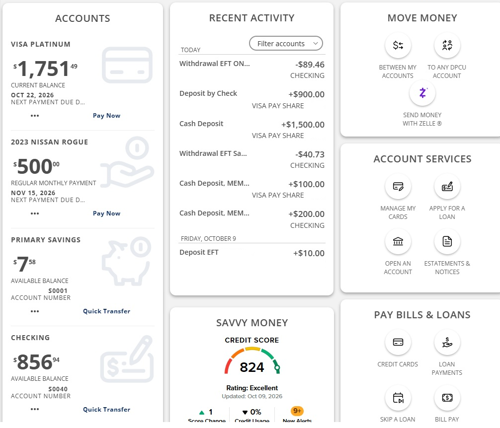
Your new and improved Dutch Point Credit Union Digital Banking experience is officially here!
We've introduced a fresh, modern design across both our mobile app and desktop experience, making it easier to access your accounts, find everyday banking tools, and manage your money with confidence.
From a more personalized dashboard to easier navigation, the updated experience puts the information and features you use most within reach.
What’s changed is the experience—not the way you bank with us.
Designed Around the Way You Bank
Your Digital Banking experience should make managing your money simple. That's why we've made improvements that help you find what you need and get things done with ease.
A Fresh, Modern Look
Enjoy a cleaner, more modern design that makes navigating Digital Banking easier, whether you're using your phone or computer.
Your Accounts, Your Way
Keep the accounts that matter most to you front and center. With the updated dashboard, you can choose which accounts appear by marking them as favorites, giving you easier access to the information you check most often.
Easier Access to Everyday Banking
Find frequently used tools and services more easily, including transferring money, paying bills, managing your cards, and accessing account services.
A Better View of Your Recent Activity
Stay on top of your finances with the Recent Activity section. View transactions across your accounts and use filters to focus on the activity you want to see.
What’s Staying the Same
While Digital Banking has a new look and feel, many of the things you rely on remain available.
-
Same Login ID and password: Continue signing in using your existing credentials.
-
No new app required: Keep using the Dutch Point mobile app you already have.
-
Same everyday banking services: Bill Pay, external transfers, Zelle®, and other existing Digital Banking features remain available.
-
Same convenient access: Continue banking through our mobile app or website, just as you always have.
A new look. The same convenient banking experience you know and trust.
Make the Most of Your New Dashboard
Your dashboard is designed to give you convenient access to your accounts and everyday banking activities. Here are a few ways to personalize your experience.
Choose Your Favorite Accounts
Want to see certain accounts on your main dashboard? Select View All Accounts and click or tap the star next to the accounts you'd like to display.
You can add or remove favorites at any time. Accounts that aren't marked as favorites will still be available through View All Accounts.
Customize Your Recent Activity
The Recent Activity section displays transactions from all accounts linked to your Digital Banking profile by default.
Use the available filters to focus on transactions from specific accounts, making it easier to keep track of the activity that's most important to you.
Explore Your Everyday Banking Tools
With updated navigation and convenient access to frequently used services, you can easily find the tools you need to transfer money, pay bills, manage accounts, and more.
Frequently Asked Questions
We updated Digital Banking to provide a more modern, intuitive, and convenient experience. The refreshed design makes it easier to navigate, access your accounts, and find the banking tools you use most across mobile and desktop.
Our new Digital Banking experience launched on October 28, 2026, and is now available to members through the Dutch Point mobile app and desktop Digital Banking.
No. The new Digital Banking experience has replaced the previous version for all members. While the appearance and navigation have changed, your existing banking services remain available.
Managing Your Dashboard and Accounts
Your main dashboard displays the accounts marked as favorites. You can choose which accounts appear by selecting View All Accounts and clicking or tapping the star next to each account to add or remove it from your favorites.
This allows you to keep the accounts you use most right on your main dashboard.
If no accounts appear on your main dashboard, you may not have any accounts marked as favorites.
To add accounts, select View All Accounts and click or tap the star next to the accounts you'd like to display. Once selected, they'll appear on your main dashboard.
The account may be marked as a favorite. If you'd prefer not to see it on your main dashboard, select View All Accounts and click or tap the star next to the account to remove it from your favorites.
The account will no longer appear on your main dashboard but will still be accessible through View All Accounts.
Recent Activity
By default, the Recent Activity section displays transactions from all accounts linked to your Digital Banking profile.
To customize your view, use the available filters to select which accounts' transactions you'd like to see.
This makes it easier to focus on the activity that's most important to you.
Getting Help
We're here to help! If you have questions about the updated Digital Banking experience or need assistance finding a feature, our team is happy to guide you.
You can call us at 800.842.1778, visit one of our branches, or explore our Contact Us page for additional ways to connect.
Explore Your New Digital Banking Experience
Your everyday banking just got a fresh new look.
Whether you're checking balances, moving money, paying bills, or managing your accounts, your updated Digital Banking experience is designed to help you get where you need to go.
A fresh look. Easier access. Right on point.
Download our mobile banking app


Mobile Wallets: Accommodating Mobile Payments & More
Learn how mobile wallets make everyday purchases easier and more secure.
Dutch Point Blog
Resources to support your financial goals
Fast, Safe, Easy.
Use Zelle to send money in minutes to friends, family and others you trust, right from the Dutch Point Credit Union mobile app.
